Getting Started on Roblox: Account Setup & Play Guide
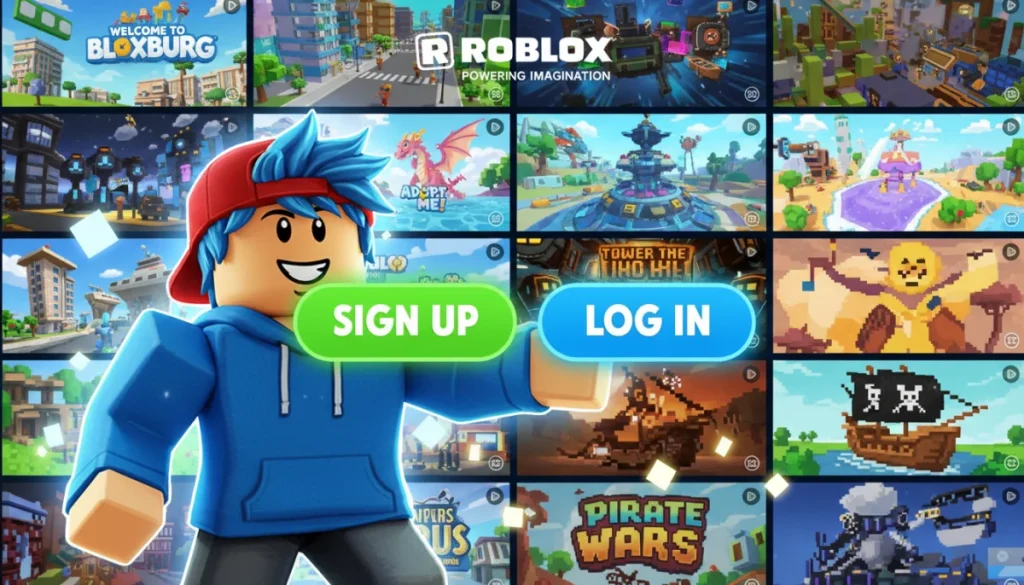
Setting up a Roblox account and starting to play involves creating a free profile, understanding the platform’s interface, and exploring the vast collection of user-generated games available.
Are you an Aussie keen to dive into the exciting world of Roblox but aren’t sure where to begin? This comprehensive guide on Roblox account setup and gameplay will walk you through every essential step, ensuring a smooth start to your virtual adventures.
Understanding Roblox: A World of Imagination
Roblox is more than just a gaming platform; it’s a universe of immersive experiences created by a global community of developers. For Australian players, it offers an incredible opportunity to connect, create, and play in a safe and dynamic environment. Before diving into the specifics of account creation, it’s helpful to grasp what makes Roblox so unique and why millions worldwide, including countless Aussies, are captivated by it.
At its core, Roblox is a platform where users can program games and play games created by other users. These games, often referred to as ‘experiences,’ range from elaborate role-playing simulations and adventurous quests to competitive challenges and social hangouts. This user-generated content model is a significant part of Roblox’s appeal, constantly providing fresh and diverse entertainment options.
The Roblox Ecosystem
- User-Generated Content: The vast majority of games on Roblox are created by players themselves, fostering creativity and diverse gameplay.
- Social Interaction: Players can connect with friends, chat, and participate in shared experiences, building a strong online community.
- Customizable Avatars: Personalize your in-game identity with millions of clothing items, accessories, and animations, making your avatar truly unique.
- Cross-Platform Play: Enjoy Roblox on various devices, including PC, Mac, iOS, Android, Xbox, and PlayStation, allowing seamless gaming wherever you are.
Understanding these foundational aspects helps you appreciate the breadth of opportunities available once you’ve successfully completed your Roblox account setup. It’s a platform designed for endless discovery and engagement, catering to a wide range of interests and play styles.
In essence, Roblox provides a canvas for creativity and a playground for imagination. Its dynamic nature means there’s always something new to explore, making it a continually evolving and engaging experience for players of all ages.
The First Step: Creating Your Roblox Account
Embarking on your Roblox journey begins with a simple yet crucial step: creating your account. This process is designed to be straightforward and secure, ensuring that even first-time users can easily get started. Whether you’re a parent setting up an account for your child or an adult looking to explore this virtual world, following these steps will guide you through the registration process.
Accessing Roblox is free, and creating an account doesn’t require any payment. You’ll need a stable internet connection and a device compatible with the platform, such as a computer, tablet, or smartphone. The registration page prompts you for essential information to establish your unique profile within the Roblox universe.
Navigating the Registration Page
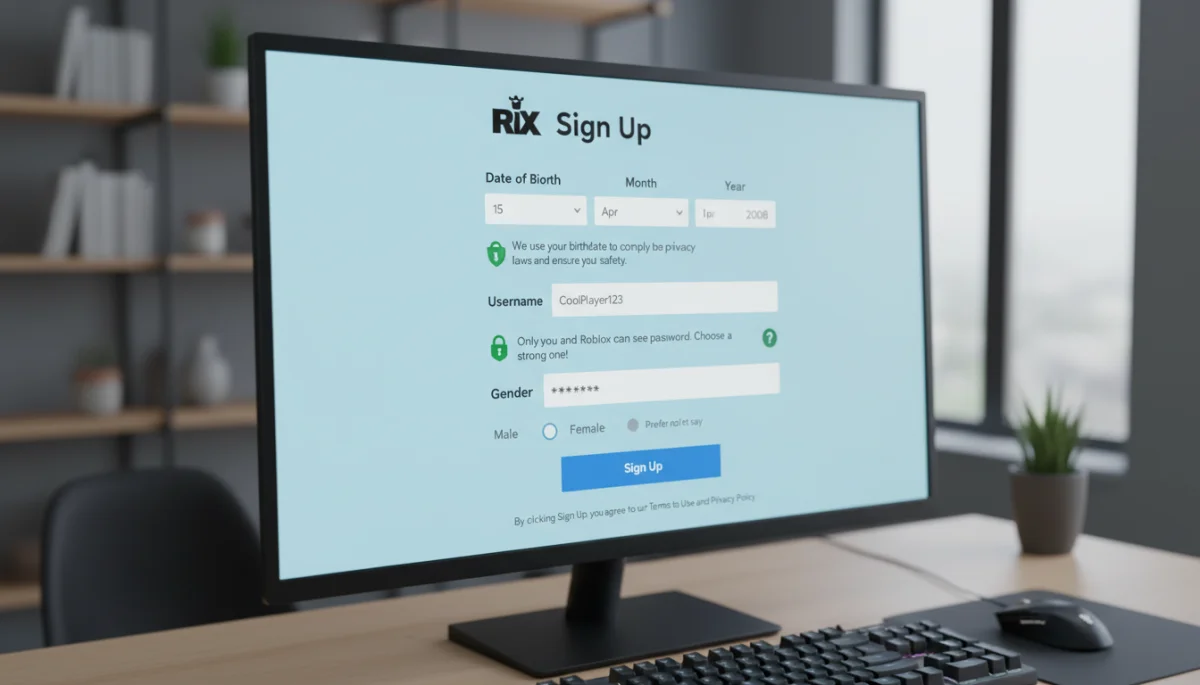
To begin, open your web browser and navigate to the official Roblox website. Look for the ‘Sign Up’ button, usually prominently displayed on the homepage. Clicking this will take you to the registration form where you’ll input your details. It’s important to provide accurate information, especially regarding your date of birth, as this helps Roblox tailor experiences and privacy settings appropriately for your age group.
- Date of Birth: Select your accurate date of birth. This is crucial for age-appropriate content filtering and safety features, particularly for younger players.
- Username: Choose a unique username. This will be your identity within Roblox, so pick something memorable and appropriate. It cannot contain your real name and must adhere to Roblox’s community standards.
- Password: Create a strong, secure password. Use a combination of letters, numbers, and symbols to protect your account. Avoid using easily guessable passwords.
- Gender (Optional): You can choose to specify your gender, though this field is entirely optional and does not affect gameplay.
After filling in all the required fields, simply click the ‘Sign Up’ button. Congratulations! You’ve successfully created your Roblox account. This initial setup is the gateway to countless hours of entertainment and creativity, allowing you to personalize your avatar and start exploring.
Remember, keeping your account details secure is paramount. Never share your password with anyone, and be wary of suspicious links or requests for personal information. Roblox prioritizes user safety, but vigilance on your part is an important layer of protection.
Personalizing Your Avatar: Making Your Mark
Once your account is set up, one of the most exciting aspects of Roblox is the ability to customize your avatar. Your avatar is your digital representation in the Roblox world, and personalizing it allows you to express your creativity and stand out from the crowd. The platform offers an extensive catalog of items, both free and purchasable with Robux, to help you craft your unique look.
The avatar customization process is intuitive and fun. You can access the avatar editor from your Roblox homepage, typically found in the navigation menu. Here, you’ll find various categories for customization, including body parts, clothing, accessories, and animations. This personalization is a key part of the Roblox experience, enabling players to truly make their mark.
Exploring the Avatar Editor
The avatar editor is a powerful tool, allowing for detailed customization. You can change your avatar’s body shape, skin tone, and facial features. Beyond the basic structure, a vast array of clothing options, from casual wear to elaborate costumes, is available to suit any style. Accessories, such as hats, glasses, wings, and more, further enhance your avatar’s appearance.
- Body Customization: Adjust body parts, skin tone, and facial expressions to create a unique base for your avatar.
- Clothing Options: Choose from shirts, pants, t-shirts, and outfits. Many free options are available, alongside premium items.
- Accessories: Add hats, hair, face accessories, neck accessories, shoulder accessories, front accessories, back accessories, and waist accessories to complete your look.
- Animations: Select different walk, run, jump, fall, and emote animations to give your avatar personality.
Many free items are available to get you started, allowing you to experiment with different styles without spending Robux. However, if you wish to unlock premium items, you can purchase Robux, the virtual currency of Roblox. Remember to always seek parental permission before making any in-app purchases.
Your avatar is a reflection of your personality within the Roblox metaverse. Taking the time to personalize it not only enhances your personal experience but also allows for greater self-expression as you interact with others and explore various games.
Navigating the Roblox Homepage and Discovering Games
With your account created and avatar customized, it’s time to explore the heart of Roblox: the games! The Roblox homepage is your central hub for discovering new experiences, connecting with friends, and managing your account. Understanding its layout will help you quickly find what you’re looking for and dive into the action.
The homepage is designed for easy navigation, featuring a prominent search bar, various game categories, and quick access to your friends list and inventory. It’s where the magic of discovery happens, presenting a curated selection of popular, trending, and recommended games tailored to your interests.
Key Homepage Features
Upon logging in, you’ll see a dynamic display of games. These are often categorized by popularity, genre, or special events. You can scroll through these selections, or use the search bar to find specific games, creators, or even friends. The left-hand navigation bar provides access to your profile, avatar editor, messages, and Robux balance.
- Games Section: This is the main area where you can browse and discover a vast array of experiences. Games are often sorted into categories like ‘Popular,’ ‘Top Earning,’ ‘Recommended,’ and various genres.
- Search Bar: Located at the top of the page, this allows you to search for specific game titles, creators, or even other players.
- Friends List: Easily access your friends, see what games they’re playing, and join them in their adventures.
- Chat: Communicate with your friends directly through the built-in chat system.
- Robux Balance: Keep track of your virtual currency, which can be used to purchase in-game items, avatar accessories, and more.
Exploring the games section is an adventure in itself. Each game listing typically includes a thumbnail image, title, creator, and a brief description. Clicking on a game will take you to its dedicated page, where you can view more details, read reviews, and ultimately decide if you want to play. Many games also offer a ‘Play’ button directly from the homepage for quick access.
Don’t be afraid to experiment and try out different games. The beauty of Roblox lies in its diversity, and you might discover a new favorite genre or experience that you never expected to enjoy. The homepage serves as your portal to this expansive universe of possibilities.
Joining and Playing Your First Roblox Game
With your account ready and games discovered, the next exciting step is to join and play your very first Roblox game. This process is designed to be seamless, getting you into the action with just a few clicks. Understanding how to launch a game and navigate its basic controls will help you quickly immerse yourself in the experience.
Every game on Roblox has its unique objectives and mechanics, but the fundamental act of joining a game remains consistent. Once you’ve selected an experience that piques your interest, you’ll be prompted to launch it. Roblox will automatically download any necessary assets, ensuring you have everything you need to play.
Launching a Game
When you’ve found a game you want to play, click on its thumbnail or title to go to its dedicated page. On this page, you’ll typically see a large green ‘Play’ button. Clicking this button will initiate the game launch. If you don’t have the Roblox player installed, the platform will guide you through a quick installation process. This is a one-time setup that allows all Roblox games to run on your device.
- Game Page Details: Before playing, check the game description, player count, and likes/dislikes ratio to get an idea of the experience.
- Installation Prompt: If it’s your first time playing on a device, Roblox will prompt you to download and install the Roblox Player application. Follow the on-screen instructions, which are usually straightforward.
- Joining the Server: Once the player is installed, clicking ‘Play’ will automatically launch the game and connect you to a server with other players.
Inside the game, controls are generally intuitive. Most Roblox games use standard PC gaming controls: ‘W, A, S, D’ keys for movement, the spacebar for jumping, and the mouse for camera control and interaction. For mobile devices, on-screen joysticks and buttons provide similar functionality. Many games also offer a tutorial or on-screen prompts to help you learn the specific controls and objectives.
Don’t be afraid to jump in and explore! The best way to learn a new game is often by playing it. If you find yourself struggling, many games have a community section or a ‘Help’ menu that can provide guidance. The vastness of Roblox means there’s always something new to learn and master.
Safety and Community Guidelines: Playing Responsibly
Roblox is committed to providing a safe and positive environment for all its players, especially in Australia. Understanding and adhering to the platform’s safety features and community guidelines is crucial for a responsible and enjoyable experience. This section highlights key aspects of online safety and how Roblox fosters a respectful community.
The platform employs robust moderation systems, including human moderators and AI, to monitor content and interactions. However, player awareness and proactive measures are also vital. Parents, in particular, should familiarize themselves with the parental controls available to ensure a safe gaming experience for younger users.
Key Safety Features and Practices
Roblox has implemented various features to protect its users. The chat filter is a primary tool, automatically blocking inappropriate language and personal information. Users also have the ability to report suspicious behavior or inappropriate content, contributing to a safer community. It’s important for players to know how to use these tools effectively.
- Chat Filtering: Roblox automatically filters out inappropriate words, phrases, and attempts to share personal information in chat.
- Reporting Tools: If you encounter any user or content that violates community standards, use the in-game reporting tools to alert moderators.
- Blocking Users: You can block other players to prevent them from sending you messages or joining your games.
- Privacy Settings: Customize who can chat with you, send you messages, and join your private servers through your account’s privacy settings.
- Parental Controls: Parents can set spending limits, restrict chat, and control who their children can interact with through the Roblox website’s account settings.
Beyond these features, fostering a positive community relies on players’ adherence to the Roblox Community Standards. These guidelines promote respectful interaction, prohibit bullying, harassment, and any form of discrimination. By understanding and following these rules, you contribute to a more enjoyable and inclusive environment for everyone.
Remember, online safety is a shared responsibility. By staying informed, using the available tools, and promoting positive behavior, you can help make Roblox a fantastic place for all Australian players to explore and connect.
Advanced Tips for Australian Roblox Players
Once you’re comfortable with the basics of Roblox account setup and gameplay, there’s a whole world of advanced tips and tricks to enhance your experience, especially for Aussie players looking to get the most out of the platform. These tips can help you discover new content, optimize your gameplay, and connect with the broader Roblox community more effectively.
From understanding Robux and premium features to exploring game development and staying updated with the latest trends, taking your Roblox journey to the next level involves a bit more strategic engagement. These insights will empower you to delve deeper into the platform’s capabilities and community.
Maximizing Your Roblox Experience
For those looking to go beyond casual play, consider exploring the Roblox developer tools. Roblox Studio, a free application, allows users to create their own games and experiences. This can be a rewarding way to engage with the platform, fostering creativity and potentially even earning Robux if your creations become popular. Additionally, staying informed about Roblox events and updates can provide exclusive opportunities.
- Robux Management: Understand how to earn and spend Robux wisely. Consider a Roblox Premium subscription for monthly Robux stipends and exclusive benefits.
- Roblox Studio: If you’re creatively inclined, download Roblox Studio to start building your own games. It’s a fantastic way to learn coding and game design.
- Community Forums & Groups: Join official Roblox forums and community groups to connect with other players, find game recommendations, and participate in discussions.
- Stay Updated: Follow Roblox’s official social media channels and blogs for news on updates, events, and new features relevant to the Australian gaming scene.
- Explore Diverse Genres: Don’t limit yourself to popular games. Use the search filters to explore niche genres and discover hidden gems created by talented developers.
Engaging with the Roblox community is another powerful way to enhance your experience. Many Australian players form groups or join online communities to share tips, find teammates, or collaborate on projects. This social aspect adds another layer of enjoyment and can lead to lasting friendships.
Ultimately, Roblox is a platform that grows with you. The more you explore, create, and interact, the richer your experience will become. These advanced tips are designed to help you unlock the full potential of Roblox and enjoy everything it has to offer.
| Key Point | Brief Description |
|---|---|
| Account Creation | Simple, free process requiring date of birth, username, and a strong password for security. |
| Avatar Personalization | Customize your in-game identity with diverse free and premium items, expressing creativity. |
| Game Discovery | Navigate the homepage, use search, and explore categories to find and join millions of unique games. |
| Safety Guidelines | Utilize chat filters, reporting tools, and parental controls for a secure and positive gaming environment. |
Frequently Asked Questions About Roblox
Yes, Roblox is completely free to download and play in Australia. You can create an account and access millions of games without any cost. However, there are optional in-game purchases, such as Robux (the virtual currency) and premium avatar items, that can enhance your experience.
When creating a username, choose something unique that doesn’t reveal any personal information like your real name, age, or location. Roblox has filters to help, but picking a creative, non-identifiable name is an important step in maintaining online privacy and safety on the platform.
Robux is Roblox’s virtual currency. You can use it to buy avatar accessories, game passes, and special abilities in games. Robux can be purchased with real money through the Roblox website or app, earned through a Roblox Premium subscription, or by creating popular games in Roblox Studio.
Absolutely! Roblox supports cross-platform play, meaning you can play with friends regardless of whether they are on PC, Mac, iOS, Android, Xbox, or PlayStation. As long as you’re in the same game server, you can connect and enjoy experiences together, enhancing the social aspect of the platform.
Parents can enhance safety by setting up robust privacy settings, enabling account restrictions, and using parental controls available on the Roblox website. Regularly discuss online safety with your child, teach them about reporting inappropriate content, and encourage open communication about their online activities to ensure a secure experience.
Conclusion
Embarking on your Roblox journey, from the initial Roblox account setup to diving into its vast universe of games, is an exciting prospect for Australian players. This guide has provided a comprehensive roadmap, ensuring you’re well-equipped to navigate the platform safely and effectively. By understanding the basics of account creation, avatar customization, game discovery, and essential safety guidelines, you’re now ready to unlock endless hours of creativity, connection, and entertainment. Remember that Roblox is a dynamic and evolving platform, constantly offering new experiences and opportunities for engagement. Embrace the journey, explore with curiosity, and enjoy the vibrant community that makes Roblox a truly unique and immersive digital world.
